To execute the example, create an HTML page and execute the following operations:
1. Add links to the following files: PP.css, PP.Express.css.
Also add links to the following JS files: PP.js, PP.Metabase.js, PP.Express.js and resources.ru.js.
2. In the <head> tag specify style for the elements:
<style type="text/css">
    body, html {
        height: 100%;
        width: 100%;
        margin: 0;
        padding: 0;
        overflow: hidden;
    }
</style>
3. Then in the <head> tag add a script that creates a container for the express report tool ribbon EaxRibbon:
var metabase, eaxAnalyzer, eaxMbService, settings, ribbon, waiter, saveAsD, openD, eaxGrid;
var IMAGE_PATH = "../Img/";

function createView(source, service) {
    // Create the Waiter component
    eaxGrid = new PP.Exp.Ui.EaxGrid({
        ParentNode: document.body,
        Source: eaxAnalyzer,
        Service: eaxMbService,
        Height: 300,
        Width: 300,
        ImagePath: IMAGE_PATH
    });
    var chartCategory, tableCategory, dataCategory, mapCategory, titleCategory;
    // Create container for express report ribbon
    ribbon = new PP.Exp.Ui.EaxRibbon({
        Source: eaxAnalyzer, // Set data source for ribbon
        Enabled: true, // Enable the ribbon
        ImagePath: IMAGE_PATH,
        MainButton: {
            Content: "dataCategory"
        },
        ParentNode: document.body,
        // Set tabs for ribbon
        Categories: [
        // Create the Chart tab
        chartCategory = new PP.Exp.Ui.ChartCategory({
            Source: eaxAnalyzer, // Set data source for tab
            Service: eaxMbService, // Set service
            // Specify DataChanged event handler
            MatadataChanged: function (sender, args) {
                eaxGrid.refresh(args); // Refresh table
            },
            // Specify ControlChanged event handler
            ControlChanged: function (sender, args) {
                eaxGrid.refresh(args); // Refresh table
            },
            // Set PropertyChanged event handler
            PropertyChanged: function (sender, args) {
                alert("Property is changed on the Chart tab");
            },
            // Set RequestMetadata event handler
            RequestMetadata: function (sender, args) {
                alert("Metadata is requested on the Chart tab");
            },
            ImagePath: IMAGE_PATH
        }),
        // Create the Data tab
        dataCategory = new PP.Exp.Ui.DataCategory({
            Source: eaxAnalyzer, // Set data source for tab
            ImagePath: IMAGE_PATH,
            Service: eaxMbService,
            // Specify DataChanged event handler
            MetadataChanged: function (sender, args) {
                eaxGrid.refresh(args); // Refresh table
            },
            // Set PropertyChanged event handler
            PropertyChanged: function (sender, args) {
                alert("Property is changed on the Data tab");
            },
            // Set RequestMetadata event handler
            RequestMetadata: function (sender, args) {
                alert("Metadata is requested on the Data tab");
            }
        }),
        // Create the Map tab
        mapCategory = new PP.Exp.Ui.MapCategory({
            Source: eaxAnalyzer, // Set data source for tab
            ImagePath: IMAGE_PATH,
            Service: eaxMbService,
            // Specify DataChanged event handler
            MetadataChanged: function (sender, args) {
                eaxGrid.refresh(args); // Refresh table
            },
            // Set PropertyChanged event handler
            PropertyChanged: function (sender, args) {
                alert("Property is changed on the Map tab");
            },
            // Set RequestMetadata event handler
            RequestMetadata: function (sender, args) {
                alert("Metadata is requested on the Map tab");
            }
        }),
        // Create the Table tab
        tableCategory = new PP.Exp.Ui.TableCategory({
            Source: eaxAnalyzer, // Set data source for tab
            ImagePath: IMAGE_PATH,
            DataView: eaxGrid,
            Service: eaxMbService,
            // Specify DataChanged event handler
            MetadataChanged: function (sender, args) {
                eaxGrid.refresh(args); // Refresh table
            },
            // Set PropertyChanged event handler
            PropertyChanged: function (sender, args) {
                alert("Property is changed on the Table tab");
            },
            // Set RequestMetadata event handler
            RequestMetadata: function (sender, args) {
                alert("Metadat is requested on the Table tab");
            }
        }),
        // Create the Title tab
        titleCategory = new PP.Exp.Ui.TitleCategory({
            Source: eaxAnalyzer, // Set data source for tab
            ImagePath: IMAGE_PATH,
            Service: eaxMbService,
            // Specify DataChanged event handler
            MetadataChanged: function (sender, args) {
                eaxGrid.refresh(args); // Refresh table
            },
            // Set PropertyChanged event handler
            PropertyChanged: function (sender, args) {
                alert("Property is changed on the Title tab");
            },
            // Set RequestMetadata event handler
            RequestMetadata: function (sender, args) {
                alert("Metadata is requested on the Title tab");
            }
        })],
        Width: 600,
        Height: 600,
        // Set Collapsed event handler
        Collapsed: function (sender, args) {
            alert("Collapse");
        },
        // Set Expanded event handler
        Expanded: function (sender, args) {
            alert("Expand");
        },
        // Set Printing event handler
        Printing: function (sender, args) {
            alert("Print");
        },
        // Set SaveAs event handler
        SaveAs: function (sender, args) {
            alert("The Save As menu item is selected");
        },
        // Set DataChanged event handler
        DataChanged: function (sender, args) {
            // Refresh table
            eaxGrid.refresh(args);
        },
        // Set DiscussMenuOpened event handler
        DiscussMenuOpened: function (sender, args) {
            alert("The Discuss in SharePoint menu is opened");
        },
        // Set Discuss event handler
        Discuss: function (sender, args) {
            alert("The Discuss in SharePoint menu item is selected");
        },
        // Set PropertyChanged event handler
        PropertyChanged: function (sender, args) {
            alert("Property is changed");
        },
        // Set NewReport event handler
        NewReport: function (sender, args) {
            alert("The New Report menu item is selected");
        },
        // Set Exported event handler
        Exported: function (sender, args) {
            alert("The Export menu item is selected");
        },
        // Set Closed event handler
        Closed: function (sender, args) {
            alert("The Close menu item is selected");
        },
        // Set Exited event handler
        Exited: function (sender, args) {
            alert("The Exit menu item is selected");
        },
        // Set Opened event handler
        Opened: function (sender, args) {
            alert("The Open menu item is selected");
        },
        // Set Saved event handler
        Saved: function (sender, args) {
            alert("The Save menu item is selected");
        },
        // Set RequestMetadata event handler
        RequestMetadata: function (sender, args) {
            alert("Request metadata");
        },
        // Set CreatedCopy event handler
        CreatedCopy: function (sender, args) {
            console.log("The Save As menu item is selected");
        },
        // Set CreatedReport event handler
        CreatedReport: function (sender, args) {
            console.log("The Save menu item is selected");
        }
    });
    // Refresh all ribbon elements
    ribbon.refreshAll();
    // Set table view for each tab
    chartCategory.bindView(eaxGrid);
    mapCategory.bindView(eaxGrid);
    titleCategory.bindView(eaxGrid);
    tableCategory.bindView(eaxGrid);
    dataCategory.bindView(eaxGrid);
}

function Ready() {
    waiter = new PP.Ui.Waiter();
    // Create repository connection
    metabase = new PP.Mb.Metabase({
        ExportUrl: "PPService.axd?action=export",
        ImportUrl: "PPService.axd?action=import",
        PPServiceUrl: "PPService.axd?action=proxy",
        Id: "prognozplatform7",
        UserCreds: {
            UserName: "user",
            Password: "password" },
        StartRequest: function () {
            // Show the Waiter component
            waiter.show();
        },
        EndRequest: function () {
            // Hide the Waiter component
            waiter.hide();
        },
        Error: function (sender, args) {
            // Output error message
            alert(args.ResponseText);
        }
    });
    // Open repository connection
    metabase.open();
    // Create a service
    eaxMbService = new PP.Exp.EaxMdService({ Metabase: metabase });
    // Open document with the 109 key
    eaxAnalyzer = eaxMbService.edit(109);
    //Create a view
    createView(eaxAnalyzer, eaxMbService);
};

window.onerror = function () {
    // In case of error hide the Waiter component
    if (waiter)
        waiter.hide();
};
4. The <body> tag and its contents must look as follows:
<body onselectstart="return false" class="PPNoSelect" onload="Ready()">
</body>
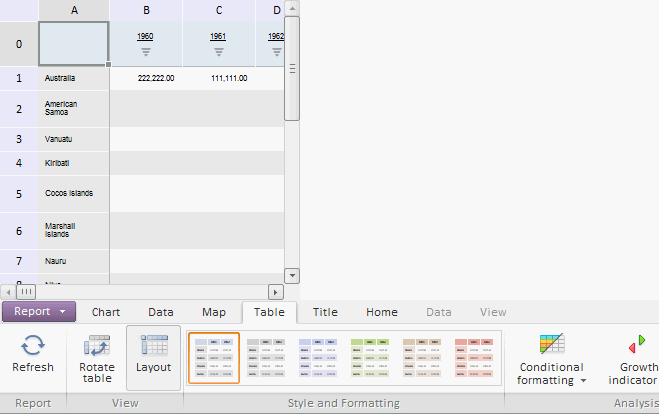
Executing the example places the EaxGrid and EaxRibbon components to the HTML page:
See also: