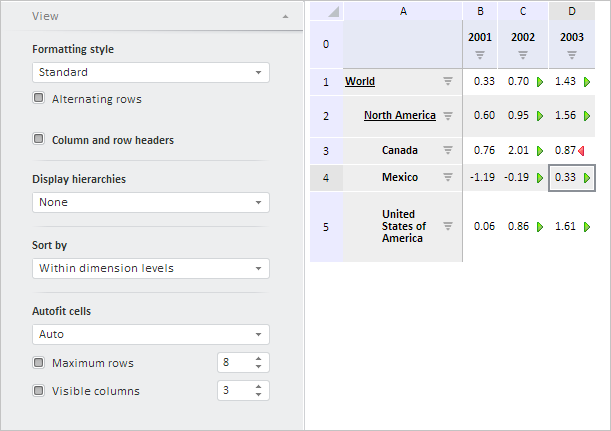
To execute the example, create an HTML page and execute the following operations:
1. Add links to the following files: PP.css, PP.Express.css.
Also add links to the following JS files: PP.js, PP.Metabase.js, PP.Express.js, and resources.ru.js.
2. Then in the <head> tag add a script that creates properties panel and a container that stores EaxGrid table. The repository must contain express report with the 4369 key:
<script type="text/javascript">
    PP.ImagePath = "../build/img/"; // Path to images folder
    PP.ScriptPath = "../build/"; // Path to scenarios folder
    PP.CSSPath = "../build/"; // Path to styles folder
    var eaxGrid, eaxPropBar;
    function Ready() {
        // Specify path to the root folder containing resources files
        PP.resourceManager.setRootResourcesFolder("../resources/");
        // Determine language settings for resources
        PP.setCurrentCulture(PP.Cultures.ru);
        var waiter = new PP.Ui.Waiter();
        // Create repository connection
        metabase = new PP.Mb.Metabase({
            PPServiceUrl: "PPService.axd?action=proxy",
            Id: "PROGNOZPLATFORM",
            UserCreds: {
                UserName: "user",
                Password: "password"
            },
            StartRequest: function () {
                // On requesting metadata show component of the PP.Ui.Waiter type
                waiter.show();
            },
            EndRequest: function (sender, args) {
                // Hide component of the PP.Ui.Waiter type
                waiter.hide();
            },
            Error: function (sender, args) {
                // Output error description
                console.log(args.ResponseText);
            }
        });
        // Open repository connection
        metabase.open();
        // Create a service for working with express reports
        var eaxMdService = new PP.Exp.EaxMdService({
            Metabase: metabase
        });
        // Open express report with the 4369 key
        eaxAnalyzer = eaxMdService.open(4369);
        // Create a container for express report table
        eaxGrid = new PP.Exp.Ui.EaxGrid({
            Source: eaxAnalyzer, // Data source for table
            ParentNode: "divTable",
            EditMode: true, // Edit Mode checkbox
            VisibleHeaders: true, // Display table row and column headers
            Width: 300,
            Height: 430,
            Service: eaxMdService,
            // After selection in table send changes to server
            AutoSendSelection: true,
            // Remove the Setup item in the table context menu
            ShowSettingsMenuItem: false,
            // Remove context menu button
            ShowContextButton: false,
            // Enable moving selection on level up the hierarchy
            UseShiftDrillUp: true,
            // Set MetadataChanged event handler
            MetadataChanged: function (sender, args) {
                console.log("Metadata is changed");
            },
            // Set DataChanged event handler
            DataChanged: function (sender, args) {
                console.log("Data is changed");
            },
            // Set ExpanderAction event handler
            ExpanderAction: function (sender, args) {
                console.log("Expander is expanded");
            },
            // Set HyperlinkMouseDown event handler
            HyperlinkMouseDown: function (sender, args) {
                console.log("Hyperlink is clicked");
            },
            // Set PictureMouseDown event handler
            PictureMouseDown: function (sender, args) {
                console.log("Table icon is clicked");
            },
            // Set event handler for the PropertyChanged property
            PropertyChanged: function (sender, args) {
                console.log("Property is changed");
            },
            // Set event handler for the Rendered property
            Rendered: function (sender, args) {
                console.log("Table is redrawn");
            },
            // Set event handler for the RequestMetadata property
            RequestMetadata: function (sender, args) {
                console.log("Metadata query");
            },
            // Set event handler for the SelectionChanged property
            SelectionChanged: function (sender, args) {
                console.log("Selected table area is changed");
            },
            // Set event handler for the SelectionChanging property
            SelectionChanging: function (sender, args) {
                // Output warning about changing of selected area to the console
                console.log("Changing of selectd area");
            },
            // Set event handler for the StructureChanged property
            StructureChanged: function (sender, args) {
                console.log("Table structure is changed");
            }
        });
        // Refresh all table contents
        eaxGrid.refreshAll();
        // Refresh table column with legend for chart
        eaxGrid.updateLegendColumn();
        // Create express report properties panel
        eaxPropBar = new PP.Exp.Ui.EaxPropertyBar({
            ParentNode: "propertyBar",
            Source: eaxAnalyzer, // Specify data source
            Width: 300,
            Height: 430,
            Service: eaxMdService,
            DimViewMode: PP.Exp.Ui.DimViewMode.Classic,
            DataView: eaxGrid // Link properties panel to table
        });
        // Load regional settings
        eaxPropBar.loadFile("../Resources/resources.ru.js");
        // Get the View panel
        var tableVP = eaxPropBar.getTableViewPanel();
        // Display this panel
        tableVP.show();
        // Expand the panel
        tableVP.expand();
    };
</script>
3. In the <body> tag as value of the onLoad attribute specify name of the function that loads express report document, bubble chart and properties panel, and also add blocks with the propertyBar and divTable identifiers:
<body onload="Ready()">
    <div id="propertyBar" style="float: left;"></div>
    <div id="divTable" style="float: left; margin-left: 10px"></div>
</body>
After executing the example the HTML page will contain the EaxPropertyBar and EaxGrid components:
During their loading the screen shows dialog boxes that contain notices on metadata request and table drawing. The View tab is shown and expanded in the properties panel.
See also: