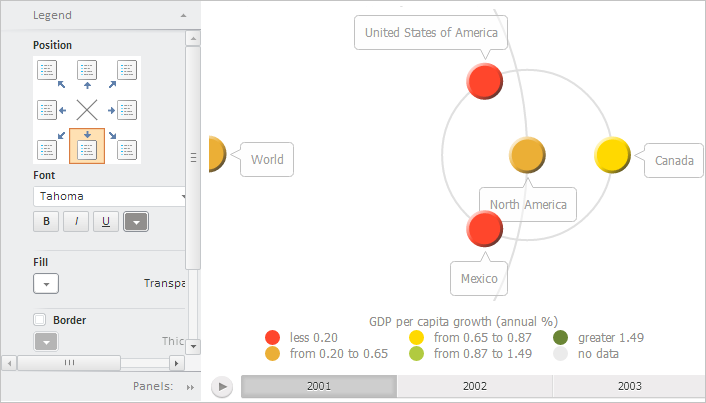
To execute the example, create an HTML page and execute the following operations:
1. Add links to the following CSS files: PP.css.
Also add links to the following JS files: PP.js, PP.Metabase.js, PP.Express.js, PP.TreeChartMaster.js, resources.ru.js.
2. Then in the <head> tag add a script that creates a container with bubble tree and bubble tree setup wizard. The repository must contain express report with the 4236 key:
<script type="text/javascript">
    var bubbleTreeBox; // Tree map container
    var propertyBar; // Properties panel
    PP.ImagePath = "../build/img/"; // Set path to images folder
    PP.ScriptPath = "../build/"; // Set path to scenarios folder
    PP.CSSPath = "../build/"; // Set path to styles folder
    // Specify path to the root folder containing resources files
    PP.resourceManager.setRootResourcesFolder("../resources/");
    // Determine language settings for resources
    PP.setCurrentCulture(PP.Cultures.ru)
    function Ready() {
        // Create repository connection
        var metabase = new PP.Mb.Metabase({
            PPServiceUrl: "PPService.axd?action=proxy",
            Id: "PROGNOZPLATFORM",
            UserCreds: {
                UserName: "user",
                Password: "password"
            }
        });
        // Open repository connection
        metabase.open();
        // Create a service for working with speedometer
        var eaxMdService = new PP.Exp.EaxMdService({
            Metabase: metabase
        });
        // Open document with the 4236 key
        var eaxAnalyzer = eaxMdService.open(4236);
        // Create a dialog box with data summary statistics
        var statisticsWindow = new PP.Exp.Ui.StatisticsWindow({
            Width: 400,
            Height: 500,
            Source: eaxAnalyzer, // Data source
            Caption: "Summary statistics"
        });
        // Create a tree map container
        bubbleTreeBox = new PP.Exp.Ui.BubbleTreeBox({
            Source: eaxAnalyzer, // Data source
            Service: eaxMdService, // Service for working with data

            ParentNode: "BubbleTreeBox",
            StatisticsWindow: statisticsWindow,
            Width: 500,
            Height: 400
        });
        // Create properties panel
        propertyBar = new PP.Exp.Ui.EaxPropertyBar({
            ParentNode: "PropertyBar",
            Service: eaxMdService, // Service for working with data
            Source: eaxAnalyzer, // Data source
            Width: 200,
            Height: 400
        });
        // Display tree map wizard
        propertyBar.showBubbleTreeMaster();
        // Link wizard to tree map container
        propertyBar.getBubbleTreeMaster().setDataView(bubbleTreeBox);
    };
</script>
3. In the <body> tag place two blocks with the IDs BubbleTreeBox and PropertyBar. These blocks will store bubble tree container and bubble tree wizard respectively:
<body onload="Ready()">
    <table>
        <tr>
            <td><div id="PropertyBar"></div></td>
            <td><div id="BubbleTreeBox"></div></td>
         </tr>
    </table>
</body>
After executing this example the HTML page contains the BubbleTreeBox and BubbleTreeMaster components:
See also: