To execute the example, in the HEAD tag of the HTML page add links to the following JS and CSS files:
PP.js.
PP.Metabase.js.
Resources file (such as resources.en).
PP.css.
The repository must contain a dictionary with the 10127 key.
In the SCRIPT tag add the following script:
        //path to resources folder
        PP.resourceManager.setRootResourcesFolder("../resources/");
        //determine the current culture
        PP.setCurrentCulture(PP.Cultures.ru);
        // Create a loading indicator
        waiter = new PP.Ui.Waiter();
        //Connect the repository:
        var mb = new PP.Mb.Metabase(
        {
            Id: "prepository",
            UserCreds: { UserName: "sa", Password: "Qwerty1" },
            StartRequest: function () { waiter.show(); },
            EndRequest: function () { waiter.hide(); },
            Error: function (sender, args) { alert(args.ResponseText); }
        });
        //Open the repository
        mb.open();
        //Create a service used to work with dimensions
        dimSrv = new PP.Mb.DimSrv({ Metabase: mb });
        var dim = dimSrv.open(10127, False, True);
        //Create an instance of the DimensionCombo component
        var dimCombo = new PP.Mb.Ui.DimCombo({
            TreeView: { Source: dim, Service: dimSrv },
            Width: 200,
            ParentNode: document.body,
        });
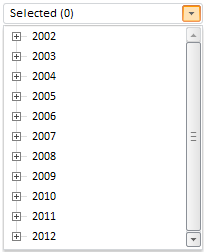
Connection to repository will be established after the example execution. The HTML page will contain the DimensionCombo component, that may look as follows:
See also: