PP.Style(settings: Object);
settings. The JSON object with the values of the class instance.
The Style constructor creates an instance of the Style class.
To execute the example, the HTML page must contain links to the jquery.js, PP.js scenario files, and the PP.css styles file. Add a text area to the document and set new style for this area:
<script type="text/javascript">
    var textArea, style;
    $().ready(function () {
        // Create a text area
        textArea = new PP.Ui.TextArea({
                Width: 200,
                Height: 100,
                Content: "2013" // Contents
            });
        // Create a yellow shadow
        var shadow = new PP.Shadow({
                Color: new PP.Color(PP.Color.Colors.yellow)
            });
        shadow.setAngle(45); // Shadow angle
        shadow.setSize(10); // Difference in shadow size relative to object
        // Create a style for text area
        style = {
            Release: new PP.Style({
                    // Create solid full brush
                    Background: new PP.SolidColorBrush({
                            Color: PP.Color.Colors.lightblue
                        }),
                    // Set bold italic
                    Font: new PP.Font({
                            IsBold: true,
                            IsItalic: true
                        }),
                    // Create a page
                    Border: new PP.Border({
                            Radius: 10
                        }),
                    Shadow: shadow // Set shadow
                })
        };
        // Set style
        textArea.setStyle(style);
        // Add this area to document
        textArea.addToNode(document.body);
        // Get style view as CSS
        console.log("CSS: " + style.Release.toCSSFormat());
    });
</script>
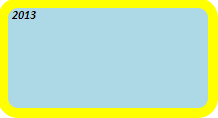
After executing the example a text area is created in the document. This area has light blue background, bold and italic font, a border with rounding radius set to 10, and yellow shadow:
The browser console displays view of the style defined for text area, as a CSS string:
CSS: box-shadow:0px 0px 0px 10px rgba(255, 255, 0, 1) ;color:#000000;font-size:12px;font-family:Calibri, Helvetica;font-weight:bold;font-style:italic;text-decoration:none;border-style:none;border-width:0px;border-radius:10px;background:#ADD8E6;
See also: