PP.Shadow(settings);
settings. JSON object that contains values of component properties.
The Shadow constructor creates an instance of the Shadow class.
To execute the example, the HTML page must contain links to the PP.js scenario file and the PP.css styles file. In the <body> tag place a block with the ID textArea, that will store a text area:
<div id="textArea" style="float:left;border: #CCCCCC 1px solid; padding: 5px; margin: 5px; width: 170px; height:90px"></div>
Next in the <body> tag add a script where we add a text area and set a new style for this area, including shadow parameters description:
// Create a text area
var textArea = new PP.Ui.TextArea({
    Width: 150, // Width
    Height: 70, // Height
    ParentNode: document.getElementById("textArea") // Parent container
});
// Create a shadow object
var shadow = new PP.Shadow({
    Enabled: True, // Shadow activity
    Color: new PP.Color(PP.Color.Colors.blue), // Shadow color
    Angle: 45, // Shadow angle
    Size: 1, // Shadow size
    EnableBlur: True, // Is blur used
    EnableOpacity: True, // Is opacity used
    BlurSize: 20, // Shadow blur size
    Distance: 10, // Shadow offset from the object
});
// Select style
var style = {
    Release: new PP.Style({
        // Select background
        Background: new PP.SolidColorBrush({
            Color: PP.Color.Colors.lightblue
        }),
        // Set border
        Border: new PP.Border({
            Radius: 10
        }),
        // Set shadow
        Shadow: shadow
    })
};
// Set text area style
textArea.setStyle(style);
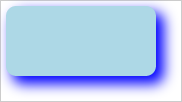
As the result a text area is created in the document, and a shadow is set for this area:
See also: